Configuration
Prepare Galène
Each stream needs a Galène group, and a token that may present in that group.
- Create the group, e.g. with
galenectl create-group -group voc-a, or with a group file. The group must allow Opus; that is the default. -
Create a token with the
presentpermission:galenectl create-token -group voc-a -permissions presentYou can also use /invite in the Galène web interface; the token is the
token=part of the generated link. Tokens expire (by default after 24 h). Use-durationfor longer-lived ones. 3. Note the WHIP endpoint. It is the group URL with.whipappended:https://galene.example.org:8443/group/voc-a/.whip
Tip
A group that lets anyone present ("wildcard-user" with
"permissions": "present") works without a token. This is convenient for
testing, but don't use it on a public server.
Set up the plugin
Insert WHIP Send as an FX on the track or bus you want to send. It works on mono and stereo tracks.
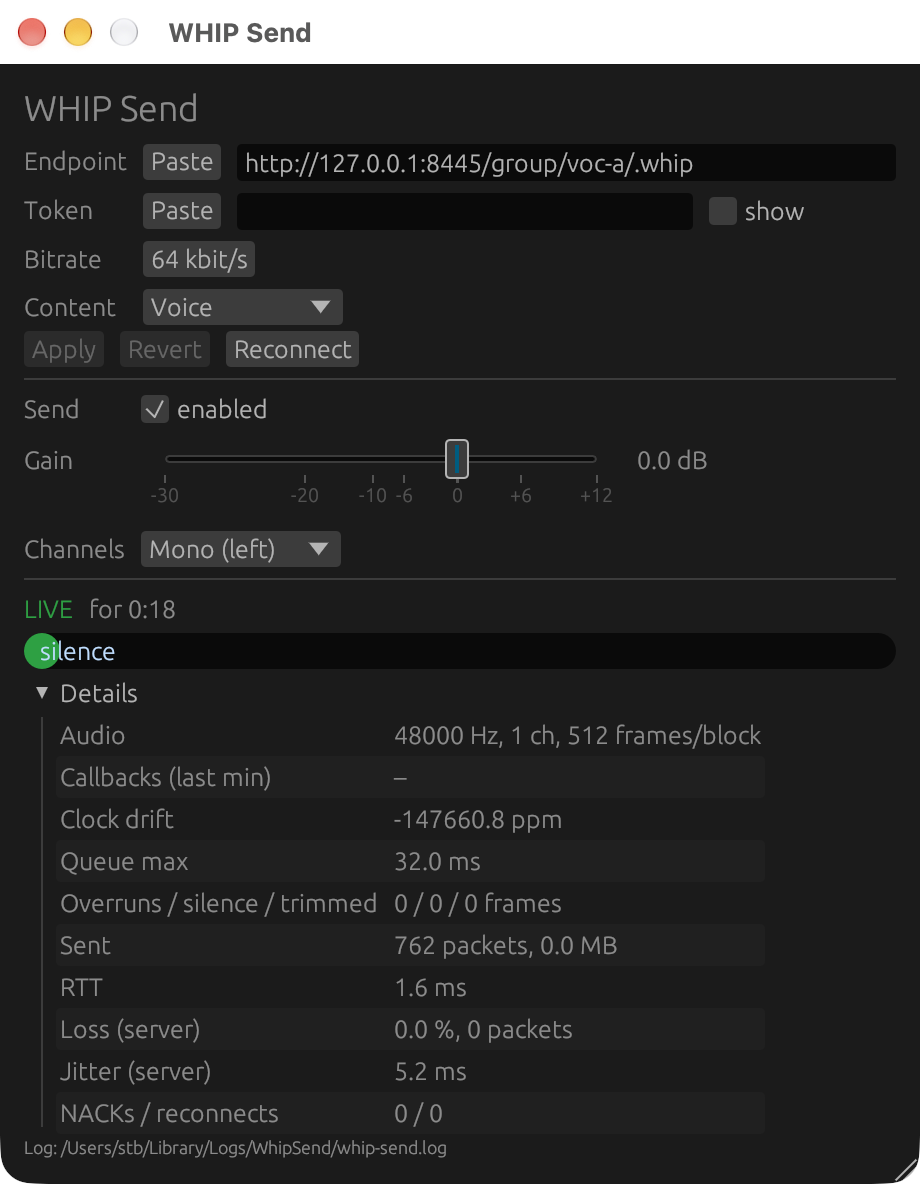
Its editor has three sections, from top to bottom:
- connection and encoder settings, with Apply, Revert and Reconnect;
- the parameters (Send enabled, Send gain, Channels);
- the status: connection state, peak meter and details (see Monitoring).
The settings fields:
| Field | Meaning |
|---|---|
| Endpoint | The WHIP endpoint URL, http:// or https://. |
| Token | The bearer token. It is masked; tick show to check it. You can also paste a whole Galène invite link; the plugin keeps only its token= part. |
| Bitrate | Opus bitrate, 16–256 kbit/s. Default 64. |
| Content | Voice tunes Opus for speech, Music for music. |
The Paste button next to Endpoint and Token replaces the field with the clipboard. Use it where the host keeps keystrokes from reaching the plugin, like Reaper on macOS (see Gotchas).
Changes to these fields only take effect when you click Apply, so typing doesn't cause reconnects. Revert discards your edits. Reconnect drops the current session and starts a new one.
Recommended settings:
| Use | Channels | Bitrate | Content |
|---|---|---|---|
| Speech, interpretation | Mono | 32–64 kbit/s | Voice |
| Music, programme | Stereo | 96–128 kbit/s | Music |
Parameters
These are normal plugin parameters, so they can be automated, assigned to controllers, or set from Reaper actions and OSC:
| Parameter | Values | Effect |
|---|---|---|
| Send enabled | on/off | Off ends the WHIP session; on starts a new one. The track's audio is unaffected either way. |
| Send gain | −30 … +12 dB | Gain applied to the sent signal only. In the editor, Shift-drag the fader for fine control; double-click it to reset to 0 dB. |
| Channels | Mono (left), Mono (right), Mono (L+R), Stereo | How the track is mapped onto the stream. On a mono track, left and right are the same. |
Where settings are stored
Endpoint, token, bitrate and content type are saved in the project file, as part of the plugin's state. Opening the project restores all feeds, ready to go.
- Reaper's FX presets store the same state. Saving one preset per feed ("voc-a", "voc-b", …) is a quick way to set up a new project.
- Rotating a token means editing it in each instance and saving the project.
Project files contain the tokens
Reaper stores plugin state encoded, but not encrypted. Treat project files, backups, auto-saves and exported presets as secrets. Don't commit them to public repositories.